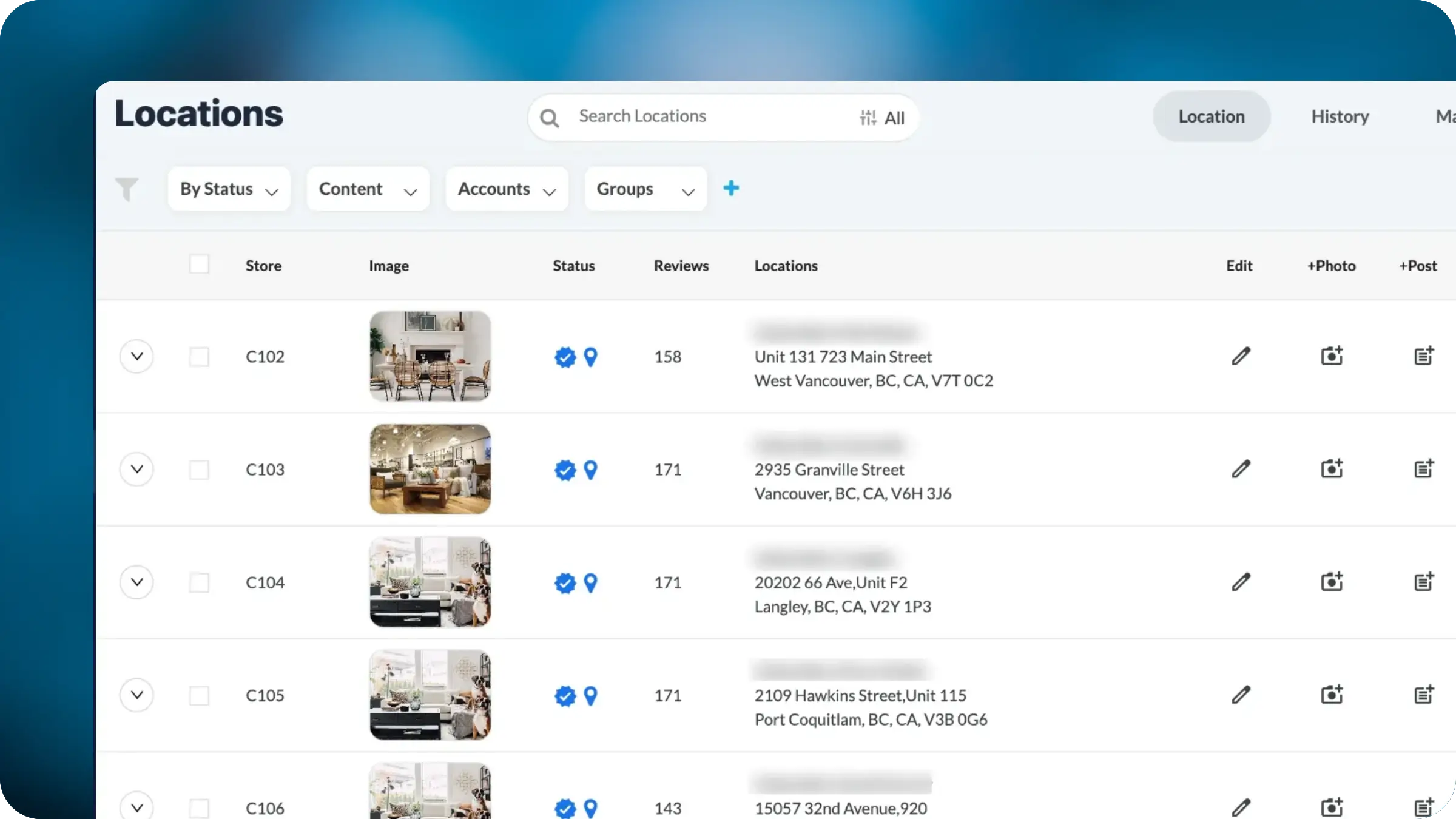
The Locations view now displays each listing's cover image directly in the location row. Teams managing multi-location portfolios can instantly see which locations have strong cover imagery, which need attention, and which are missing images entirely, without clicking into individual listings.
Cover images are one of the first things potential customers see when they encounter a business on Google. They shape first impressions, influence click-through rates, and play a meaningful role in local search engagement. Yet for businesses managing dozens, hundreds, or thousands of locations, there has been no efficient way to visually audit cover images across the portfolio. Teams had to click into each listing individually to check whether a location's cover image was current, on-brand, or even present at all.
This creates a real gap in quality control. Outdated storefront photos, incorrect images, or missing cover photos often go unnoticed for months simply because no one had the time to check every listing manually. For brands that invest in consistent visual identity across locations, this lack of visibility made it nearly impossible to enforce standards at scale.
Inline Cover Image Display
Every location row in the Locations view now shows a thumbnail of the listing's current cover image. This transforms the location list from a text-only table into a visual audit tool. Scrolling through locations immediately reveals which listings have strong imagery and which stand out for the wrong reasons.
Spot Issues Without Clicking
Missing images, low-quality photos, outdated storefronts, and off-brand visuals are now visible at a glance. Teams no longer need to open each listing individually to assess image quality. For a portfolio of hundreds of locations, this reduces what was previously hours of manual review to minutes of scrolling.
Pairs with Existing Filters and Bulk Actions
Cover image visibility works alongside the existing filter system. Teams can filter by status, content, account, or group, then visually scan the filtered results to prioritize image updates. Combined with bulk actions, teams can identify and address image gaps across entire regions or brands in a single workflow.
Supports Visual Brand Consistency
For franchise and enterprise brands where visual consistency across locations is a priority, inline cover images make it possible to enforce brand standards from one screen. Regional managers, brand teams, and content leads can quickly verify that recent image updates have been applied correctly across their locations.
This is the first step toward richer visual management within the Locations view across sources so brands have comprehensive visibility to their local presence.


