We’re introducing a new one-to-many Bulk Edit Workflow that gives you a clearer, safer way to apply the same listing update across many locations.
Instead of asking you to make a large edit with limited visibility, the workflow now shows exactly what is being changed, which listings are affected, what values currently exist, and what new value will replace them. This creates a more transparent editing process for high-impact fields like categories, attributes, hours, and other core listing details.
Bulk edits are essential for enterprise listing management, but they can also be risky. Google supports managing multiple Business Profiles in bulk, including spreadsheet-based updates, but large updates still require careful handling because a single field change can affect many public-facing profiles at once. Google also notes that when updating existing businesses by spreadsheet, unnecessary columns should be removed and blank values in included columns can delete existing information, which reinforces why clarity and control matter in any bulk-edit workflow.
That risk grows when teams are working with fields that shape how customers discover and understand a location. Categories influence how a business is represented, attributes can appear directly on the profile, and hours or special hours affect whether customers know when a location is open. For multi-location teams, the challenge is not just making the edit. It is knowing, with confidence, what is about to change before the update is submitted.
The new one-to-many edit flow is designed to reduce that uncertainty. You can review the current values across the selected listings, see how locations are grouped, enter the replacement value, and confirm the exact number of listings affected before moving forward.
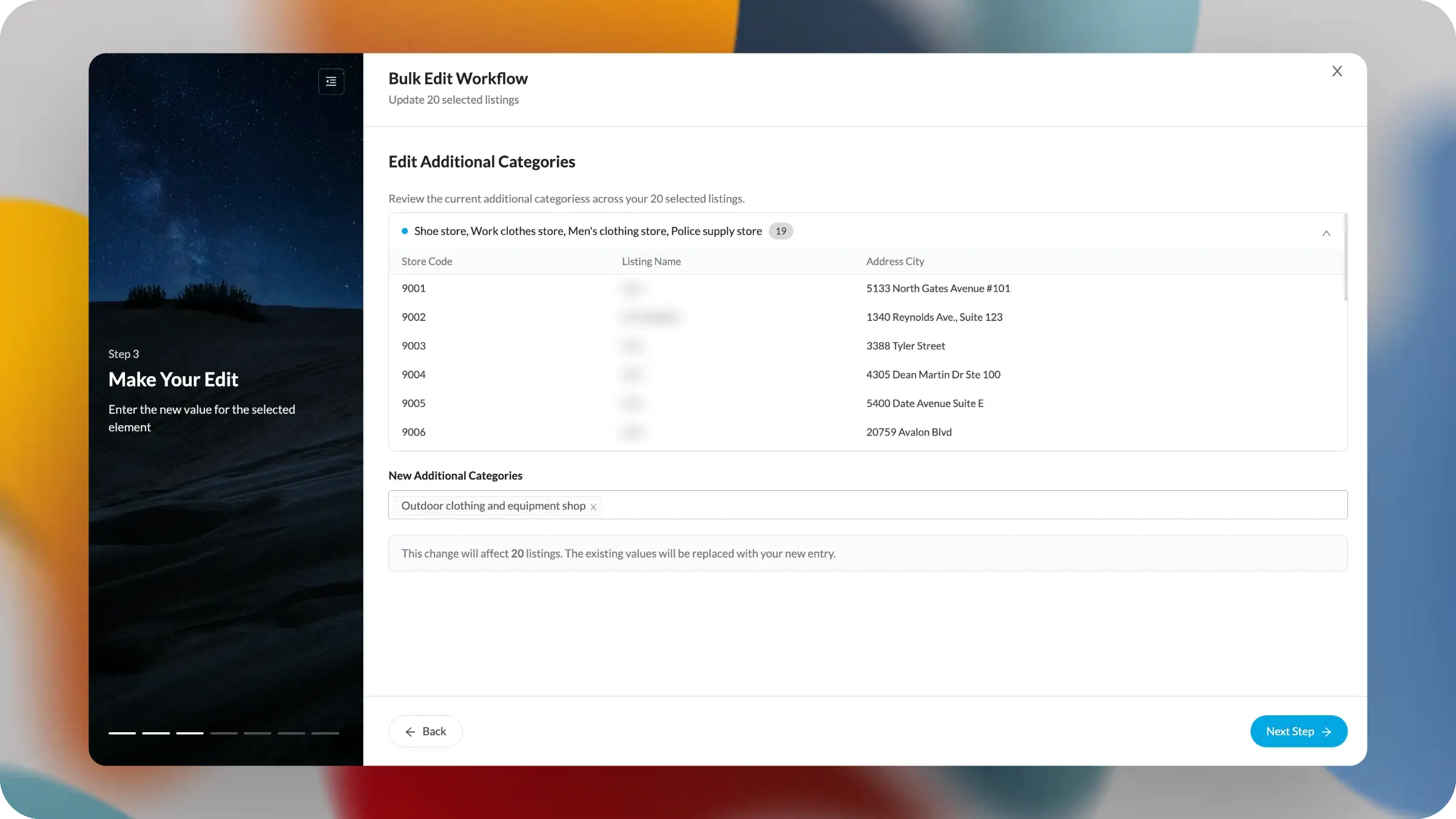
The Bulk Edit Workflow now includes a multi-step edit experience for applying one update across many selected listings.
When you choose an element to edit, the workflow presents the existing values before you enter the new value. For example, when editing additional categories, you can see the current category set, the number of listings using that set, and the individual listings included in the group.
Each group can be expanded to show supporting details such as store code, listing name, and address city. This gives you a practical review layer before the edit is applied, especially when a large set of locations appears similar but may not be identical.
After reviewing the current state, you enter the new value directly in the workflow. The interface then clearly explains the impact of the change, including how many listings will be affected and whether existing values will be replaced by the new entry.
This creates a more deliberate sequence:
Upcoming enhancements will focus on making large-scale edits even more reviewable, including better handling for mixed-value groups, clearer warnings for high-impact changes, and more tools to preview the final result before updates are published or scheduled.


