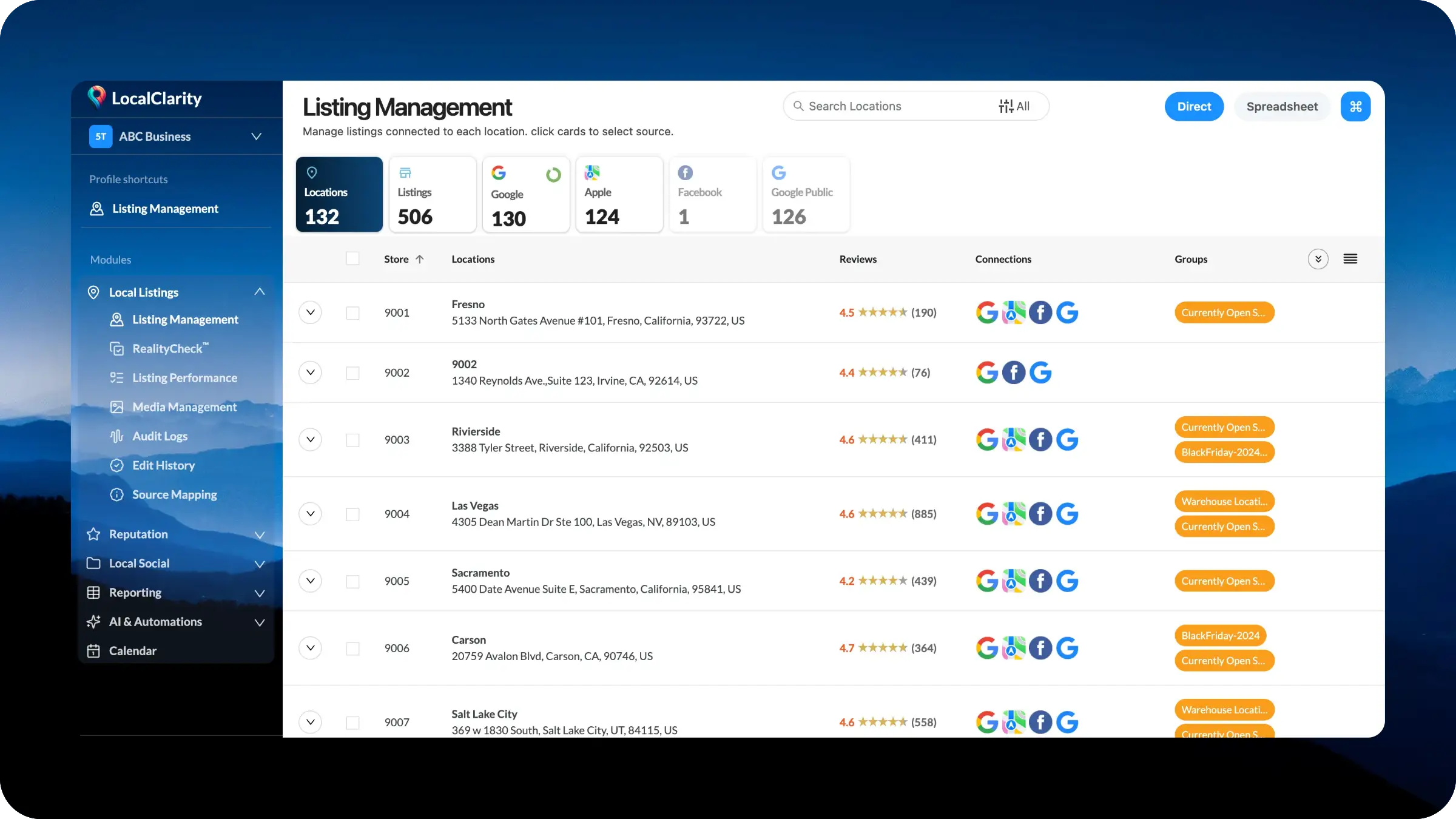
Listing Management has been redesigned around a cleaner left navigation module that groups every major listing workflow into one organized area. Instead of spreading location management, RealityCheck™, listing performance, media management, audit logs, edit history, and source mapping across separate pages and settings, the updated experience brings them together under a dedicated Local Listings module.
This new structure gives teams a clearer way to work. The main Listing Management page remains the operating center for location and source data, while the supporting workflows now sit directly beside it in the navigation. Users can move from reviewing locations, to checking source connections, to validating changes, to reviewing history, without having to hunt across the platform.
The goal is a more intuitive structure for managing listings at scale: one module, one connected workflow, and one cleaner path through the full lifecycle of local listing data.
Platforms naturally evolve over time. As customers ask for new capabilities and workflows become more advanced, new pages, settings, shortcuts, and tools are often added where they make the most sense at the time.
That approach helps teams move quickly, but over time it can create navigation that feels more fragmented than the work itself. Listing management is a good example. What started as a page for managing location records has grown into a broader set of connected workflows, including source mapping, RealityCheck™, listing performance, media management, audit logs, edit history, bulk actions, and spreadsheet-based updates.This release is part of a larger effort to rebuild the foundation of the platform navigation around how teams actually work.
At the top of the page, the listing source cards now act as navigation points. Clicking a card, such as Apple or Google, takes the user directly into the listing details for that source. This makes the cards more than summary metrics. They now serve as a fast path into the specific source data a team needs to review, validate, or manage.
The page also brings spreadsheet-based listing management into the same workflow. Instead of treating spreadsheet updates as a separate process, the new experience incorporates Management by Spreadsheet directly into the Listing Management flow. Users can choose between direct management and spreadsheet-based management from the same area, making it easier to move between individual edits and larger-scale bulk updates.
The broader Local Listings module now keeps the related supporting tools close at hand, including RealityCheck™, Listing Performance, Media Management, Audit Logs, Edit History, and Source Mapping. This gives teams one organized place to manage listing data, monitor source coverage, review changes, and support ongoing listing accuracy at scale.
In the coming weeks, greater flexibility for Apple, Bing and other primary sources will be released for all subscription levels.


