
Google highlights use your attributes and review signals. Control what users see by updating details in LocalClarity.
Have you ever searched for a business on Google and noticed details like "Outdoor seating", "Women-owned", or "Curbside pickup" listed directly on the knowledge panel?
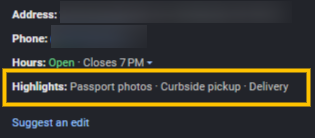
These are called highlights, and they are far from random. Highlights are powered by a combination of merchant attributes based on your listing's primary category and customer feedback from online reviews.
Merchant attributes are structured details you select to outline your services, offerings, and amenities. Attributes vary by your primary business category, meaning the options available for a doctor's office will not match those for a local cafe.
You can update these details with a true, false, or blank status either for a single location or at scale using the LocalClarity platform. Under the Listing Management module, select the listing you are looking to update. Under the Name, Address and Phone details (NAP) you will find options for Service options, Accessibility, Offerings and more.
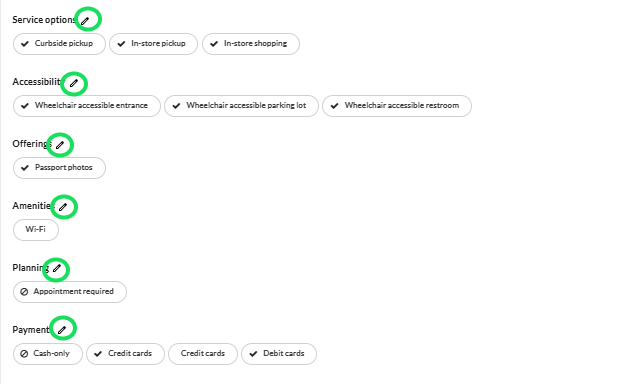
Clicking on the pencil icon will bring up the full attributes list, from there you can select which attributes are valid. Blue check marks indicate that it is true that these merchant attributes are available, the crossed out circle symbol reflects false, as in the merchant attributes are not available. Leaving it blank will keep that field empty and will push no data to Google on that attribute. Only add a merchant attribute if you are certain the service is available.
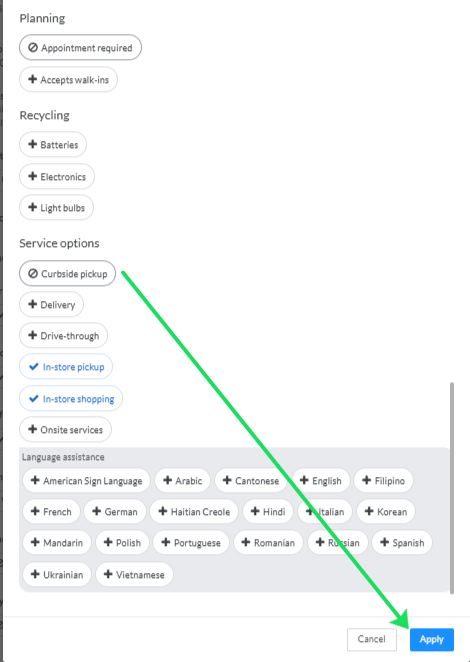
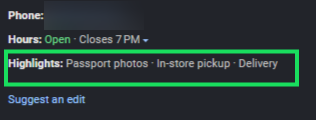
Once you have reviewed all the options, click Apply to push these changes to Google. While Google leverages its algorithms to select which three attributes appear as top highlights on your public listing, updating an unwanted attribute to false triggers a rapid change. Within minutes of updating your public highlights will shift to display a different set of details.
Customer signals are powered by keywords and feedback frequently mentioned in user reviews and Google Maps prompts. While you cannot directly edit customer-driven highlights, actively managing your online reviews and providing encouraging detailed feedback in review responses helps provide valuable context to your public profile. Curious about leveraging LocalClarity's review management capabilites? Learn more Here.
Unwanted highlights don't have to stay on your listing. Take control of your attributes in LocalClarity to help guide your customer feedback, and put your best foot forward in local search results.


