
LocalClarity’s Sentiment Analysis uses NLP to tag each review’s topics and rate each on a five-point, color-coded scale.
With LocalClarity, insights can be pulled at scale thanks to Review Sentiment Analysis. This system uses Natural Language Processing (NLP) to break each customer review into two layers: Topics (what the customer is talking about) and Sentiment (how they feel about each topic). Together, they help you understand feedback quickly and respond efficiently across multiple review sources.
Where to Activate Sentiment Analysis
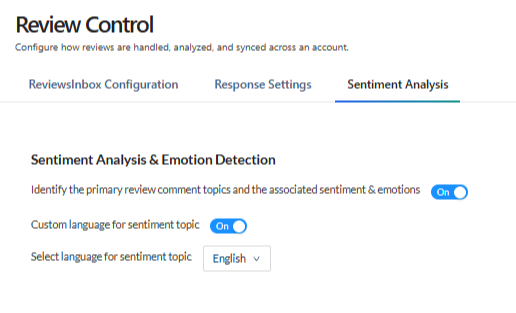
Under the Review Control section (Found in the Reputation Module) there is the Sentiment Analysis Tab. At the top is the Sentiment Analysis & Emotion Detection section, which allows you to toggle on the features that allows for identification of the primary review comment topics and the associated sentiment & emotions.
How Sentiment Detection & Analysis Works
When a review with a comment is received,it is analyzed to identify the topics it contains. A single review can contain several distinct topics, and each is identified and rated separately. For example, a review that praises your staff but criticizes wait times is tagged with two topics.
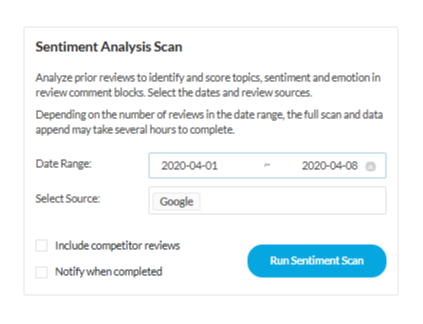
Reviews Without Comments won't be scanned because there is nothing to analyze. In the event a review is updated a retroactive sentiment analysis scan can be triggered in your Review Control Settings section, under Sentiment Analysis Tab. Simply select how far back you want to run the scan and click the “Run Sentiment Scan” Button. Users have the option to check off a box that will notify them when completed.
Sentiment is measured on a five-point scale instead of the traditional three-point scale, giving you a more nuanced view of customer feedback. Each rating is color-coded so you can scan reviews at a glance:
- Very Positive (Green): The customer expresses strong satisfaction about the topic.
- Positive (Blue): The customer expresses satisfaction about the topic.
- Neutral (Grey): The customer’s feedback on the topic is neither positive nor negative.
- Negative (Orange): The customer expresses dissatisfaction about the topic.
- Very Negative (Red): The customer expresses strong dissatisfaction about the topic.
Why a Rating Was Given to a Topic
The sentiment rating is applied to each topic rather than to the review as a whole, so a single review can contain both positive and negative topics. The reason the system identified for each rating is recorded and can be viewed in a tool-tip by hovering over the topic’s sentiment indicator.


